The CaRD Connector turns your Azure Storage Account into a fully-fledged SAP content repository — through the ArchiveLink and CMIS interfaces. Plug & play, no ABAP development.
The CaRD Connector implements both SAP-relevant content standards, so it fits classic archiving landscapes and modern, standards-based integrations alike.
SAP ArchiveLink
The classic SAP content-server protocol
Drop-in replacement for an ArchiveLink content server. Works with the scenarios you already use — no changes to your SAP processes.
GOS business attachments & SAP DMS
Print lists, inbound & outbound documents
ECL viewer & custom viewing URLs
Document classes: *, PDF, TIF and more
CMIS 1.1
The open, standards-based content interface
CMIS (Content Management Interoperability Services) with a modern REST Browser Binding — interoperable with the OASIS standard and Apache Chemistry clients.
OASIS CMIS 1.1 Browser Binding (JSON)
Repositories, folders, documents & queries
Business metadata as queryable properties
Ideal for SAP DMS, FIORI & custom apps
Storage backends
Azure Blob Storage — your content repository
Azure Blob Storage is the heart of the CaRD Connector: store SAP documents as blobs in your own Storage Account, organised in containers, enriched with business metadata. The same connector also speaks to other clouds.
Primary backend · live-verified
Microsoft Azure Blob Storage
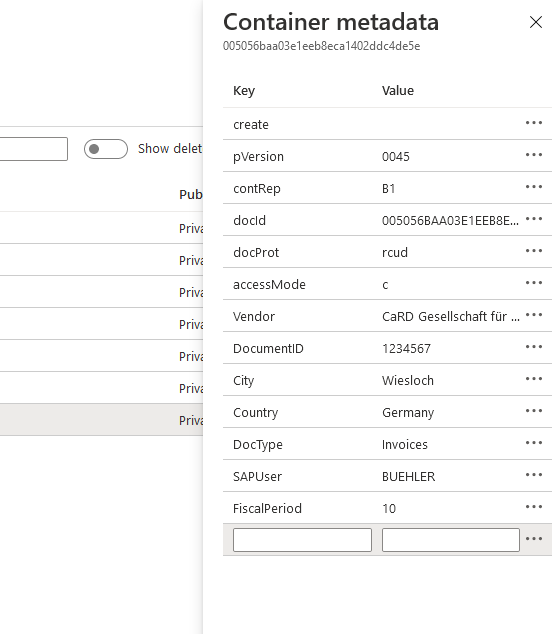
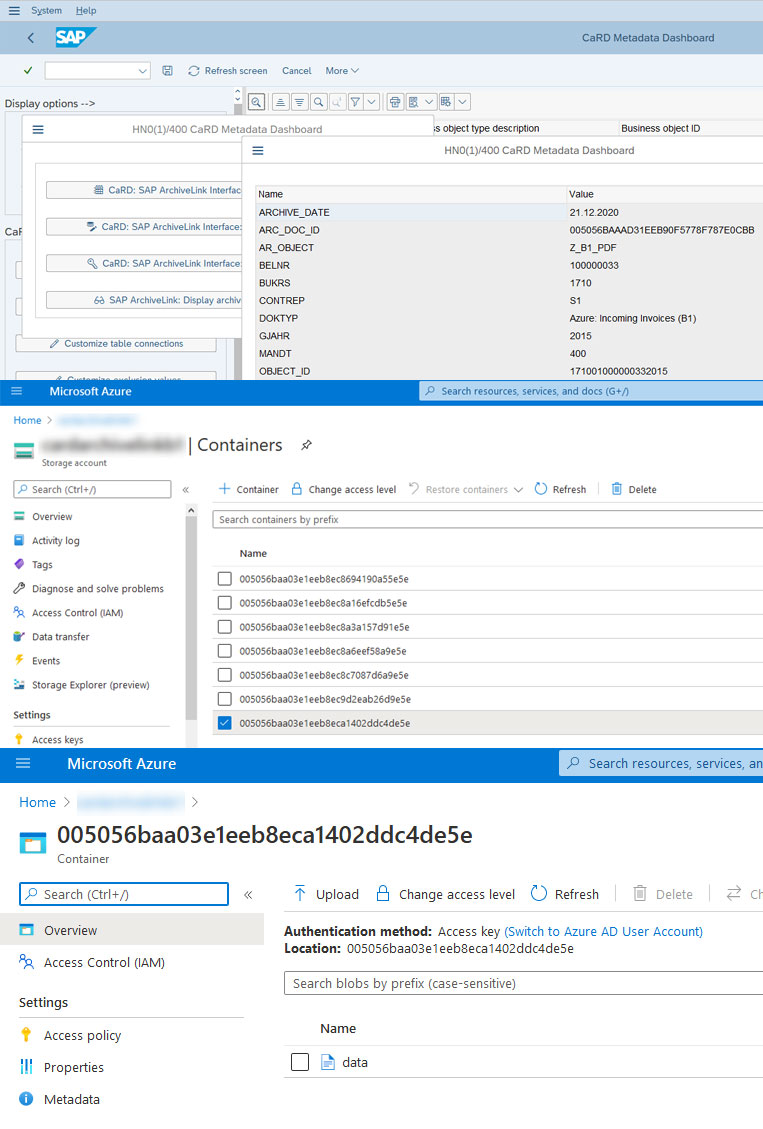
Use a standard Azure Storage Account as the SAP content repository. Documents land as blobs inside containers, with company code, document number, vendor and other SAP attributes written as blob & container metadata — so you can find them in Azure too.
Your Storage Account, your region, your access keys
Business metadata stored next to every document
Scales to millions of documents
Verified live against real SAP S/4HANA
StackIT Cloud
European sovereign cloud storage — a great fit for data-residency requirements in the EU.
AWS S3
Amazon S3 and S3-compatible object storage as an alternative content repository.
Microsoft SharePoint
Store SAP documents in a SharePoint document library, including indexed columns.
Features
Everything you need — out of the box
Years of refinement went into a connector that is powerful yet easy to configure. Most features work without any developer involvement.
Business metadata
Map SAP attributes to blob metadata with a graphical drag & drop tool — in real time, scheduled, or on demand. No ABAP development.
Containers & blobs
Create as many containers as your document model needs. Each container holds unlimited documents, stored as blobs with their metadata.
Viewing & security
View documents inside SAP, in the Azure portal, or via custom URLs. Supports the SAP * document class as well as PDF, TIF and others.
S/4HANA, RISE & ECC
Works with any CMIS-compatible system — and all SAP S/4HANA editions: RISE with SAP, private or public cloud, and on-premise. Older ECC systems connect too.
Real-time or scheduled
Keep metadata in sync synchronously, asynchronously, or via a scheduled SAP job — whichever matches your data-governance model.
Plug & play
A config wizard and all required tooling are included. On-premise in your data centre or as a CaRD-hosted instance in Azure.
Inside SAP
Works where your users already are
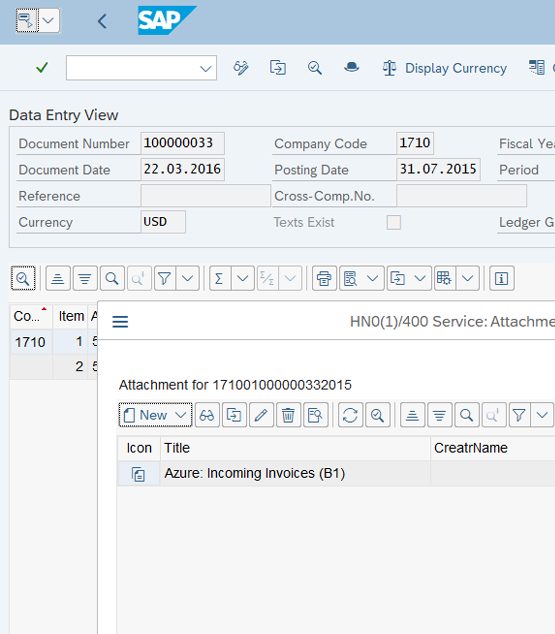
Your documents are stored in Azure as the backend, while users keep working in their familiar SAP screens. Attachments, GOS objects and DMS documents simply resolve to Azure Blob Storage.
GOS attachments & DMS
Attach and retrieve documents on business objects exactly as before.
Find documents anywhere
Search in SAP — or directly in Azure by company code, vendor and more.
Metadata mapping
Transfer & customise metadata — visually
Configure exactly which SAP fields travel with each document using our unique drag & drop mapping. React to changing requirements quickly, with no external developers and a lower roll-out budget.
Business object aware
Carry vendor, customer, company code and document-type data into Azure.
FIORI & SAP PLM
Customise metadata for FIORI attachments and SAP PLM Document Info Records.
How it works
From SAP to Azure in three steps
The connector sits between SAP and your storage, translating ArchiveLink and CMIS calls into blob operations.
1
SAP creates a document
A user attaches a file, a print list is archived, or a DMS document is created — through the standard ArchiveLink or CMIS interface.
2
The connector maps & routes
The CaRD Connector applies your metadata mapping and routes the document to the right container in your chosen backend.
3
Stored as a blob in Azure
The document is written to Azure Blob Storage with its business metadata — searchable in SAP and in Azure alike.
Supported SAP scenarios
GOS attachments SAP DMS / DIR SAP PLM FIORI WebDynpro Print lists RISE with SAP S/4HANA & ECC SAP BTP Public Cloud SAP HDM (Harmonized Document Management) Transactional data archiving (SARA)
Services
One partner for SAP and the cloud
A single point of contact for every question — whether it concerns SAP or Azure. We have been an SAP partner for more than 20 years.
Consulting
We analyse your requirements and connect SAP to Azure (and back), keeping your project on time and on budget.
Setup & support
We install and customise the connector, or show you how, so you can decide whether to run it yourself or have us manage it.
Custom development
Special requirement beyond the standard? We build customer-specific plugins and integrations on top of the connector.
Why CaRD
We what we do
CaRD was founded in 1994 and specialises in consulting and implementation services around SAP. Beyond classic process consulting, we deliver operations, roll-outs and custom development for customers worldwide.
The CaRD Connector is in production across time zones, managing millions of documents and accesses. We also bring deep expertise in SAP data migration — system harmonisation (ONE ERP), splits and merges of master and transactional data.
30+
years of experience
100+
consultants & developers
20+
years SAP partner
Live & verified
Your documents, native in SAP S/4HANA Cloud
This is a Document Info Record in SAP S/4HANA Cloud (public & private cloud). The original PDF lives in Azure Blob Storage — stored and served by the CaRD Connector, and available right inside the SAP Document app with no add-on and no ABAP development.
SAP S/4HANA Cloud (public & private) ArchiveLink & CMIS Original served live from Azure
SAP S/4HANA Cloud · Document app · original PDF stored via the CaRD Connector
FAQ
Frequently asked questions
Does the CaRD Connector require ABAP development?
No. The connector works out of the box through the standard SAP ArchiveLink and CMIS interfaces. Metadata mapping is configured with a graphical drag & drop tool — no custom ABAP development is required for typical scenarios.
Which SAP systems and releases are supported?
The connector works with any CMIS-compatible system. In particular it supports all SAP S/4HANA editions — RISE with SAP, private cloud and public cloud as well as on-premise, plus cloud-native scenarios such as SAP BTP. Older SAP ECC systems can be connected too. ArchiveLink and CMIS cover GOS attachments, SAP DMS / Document Info Records, SAP PLM, WebDynpro, FIORI, print lists, SAP HDM (Harmonized Document Management) and transactional data archiving (SARA).
ArchiveLink or CMIS — which should I use?
ArchiveLink is SAP's classic archiving and content-server protocol used for GOS attachments, DMS, print lists and the ECL viewer. CMIS is an open OASIS standard with a modern REST Browser Binding. The CaRD Connector speaks both, so you can choose whichever fits your landscape — or use them side by side.
Where is my data stored and who can access it?
Documents are stored as blobs in your own Azure Storage Account — you keep full control of the data, region and access keys. The connector can run on-premise in your data centre or as a CaRD-hosted instance in Azure.
Can I store business metadata alongside the documents?
Yes. Business attributes such as company code, document number, vendor or document type are stored as blob/container metadata, so you can search and identify your documents directly in Azure as well as in SAP.
Which storage backends are supported besides Azure Blob Storage?
Azure Blob Storage is the primary, fully live-verified backend. The same connector also supports StackIT Cloud, AWS S3 (and S3-compatible storage) and Microsoft SharePoint.
Contact
Let's connect SAP to Azure
Tell us about your landscape and we'll arrange an online demo of the CaRD Connector. We usually reply within one business day.